
Component · Controller
Raspberry Pi
The Raspberry Pi is a full Linux computer the size of a card—the brain for robots that need vision, ROS, or compute an Arduino can't handle.
What it is
The Raspberry Pi is a full computer the size of a credit card. Where an Arduino Uno is a microcontroller that runs one program forever, a Pi runs Linux—so it can drive a camera, talk to the network, run ROS 2, and execute your robot code all at once. It is the brain you reach for when a robot needs to think, not just react.
That power is also its trade-off: Linux multitasking makes the Pi worse at the microsecond-precise timing a microcontroller does effortlessly. The two are partners, not rivals.
How it works
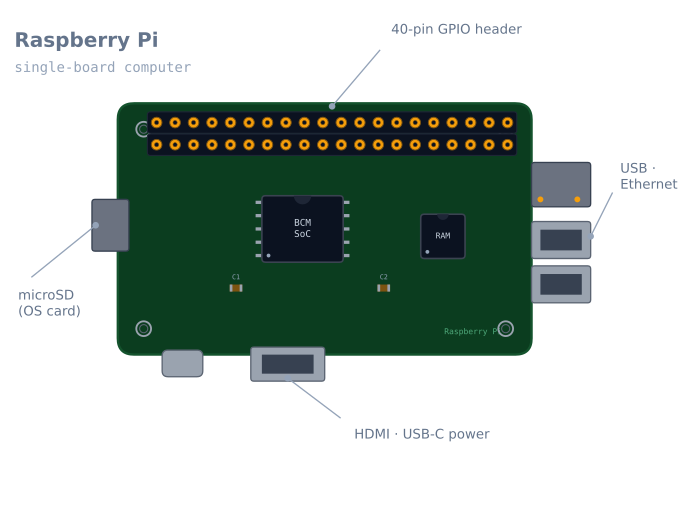
The Pi boots an operating system (usually Raspberry Pi OS) from a microSD card, then behaves like any Linux machine. For robotics, the important part is the 40-pin GPIO header: digital inputs and outputs, plus I²C, SPI, and UART buses, that let the Pi read sensors and command hardware. On top of that sit the computer parts—USB, Ethernet, Wi-Fi, and a camera interface—that a microcontroller simply doesn’t have.
A common architecture is a two-brain robot: the Pi handles perception and planning (vision, SLAM, ROS nodes) and hands motor commands down to an Arduino that does the real-time control.
When to use it
Reach for a Pi when the robot needs a computer’s abilities:
- Computer vision — a camera plus OpenCV for detecting markers, objects, or lines.
- ROS 2 — running nodes, topics, and the navigation stack.
- Mapping / SLAM — building and localising in a map.
- Networking — a web dashboard, remote control, or telemetry.
Stick with an Arduino or ESP32 for pure real-time control jobs—they’re cheaper, simpler, and better at precise timing.
Wiring and gotchas
- 3.3 V logic, and not 5 V-tolerant. Feeding a GPIO pin 5 V can damage the Pi. Level-shift signals from 5 V parts (e.g. an HC-05 TX line).
- It still can’t power motors. GPIO drives signals; motor current goes through a driver like the L298N.
- Power is fussy. Give it a stable 5 V at enough current; brown-outs corrupt the SD card and cause random reboots.
- Shut it down cleanly. Yanking power from a running Linux system can corrupt the card—design a safe power-down or use a read-only filesystem.
The 40-pin header, and which pins you can use
The header is 40 pins and only 26 of them are usable GPIO. The rest are power and ground.
| Function | Pins (BCM numbering) | Notes |
|---|---|---|
| I²C-1 | GPIO 2 (SDA), GPIO 3 (SCL) | Fixed 1.8 kΩ pull-ups to 3.3 V on the board |
| SPI0 | GPIO 10 (MOSI), 9 (MISO), 11 (SCLK), 8/7 (CE0/CE1) | |
| UART | GPIO 14 (TX), 15 (RX) | Used by the Linux console by default — must be freed |
| Hardware PWM | GPIO 12, 13, 18, 19 | Only these four; everything else is software PWM |
| Power | 3.3 V, 5 V | 5 V comes straight off the input — no regulation |
| General purpose | The rest |
Two of those rows regularly cost people an evening.
The UART is the console. Out of the box, GPIO 14/15 carry a Linux login prompt. Wire a
GPS module or an Arduino to them and you get login noise instead of data. Free them with
sudo raspi-config → Interface Options → Serial Port → login shell: no, hardware serial:
yes. On a Pi 3 and later there is a further wrinkle: the good UART is used by Bluetooth by
default, and the one on the header is a lesser “mini UART” whose baud rate drifts with the
CPU clock. Add dtoverlay=disable-bt to /boot/config.txt to swap them.
Software PWM jitters. Only four pins have hardware PWM. Everything else is generated by the kernel, and the Linux scheduler will interrupt it — which on a servo shows as visible twitching. This is the clearest illustration of what a Pi is bad at.
The timing problem, stated plainly
This is the single most important thing to understand about a Pi in a robot, and it is not a defect — it is what an operating system is.
A microcontroller running loop() executes your code and nothing else, so a 1 ms interval is
1 ms. Linux is time-sharing: the kernel can preempt your process to service a network packet,
flush a disk write, or run any of a hundred background tasks.
| Task | Microcontroller | Raspberry Pi (standard Linux) |
|---|---|---|
| 1 kHz control loop | Trivial, exact | Possible, with occasional millisecond-scale misses |
| Servo PWM | Rock steady | Visibly jittery on software PWM pins |
| Reading an encoder at 20 kHz | Routine with interrupts | Unreliable — edges get missed |
| Ultrasonic echo timing | Microsecond accurate | Random errors of several centimetres |
| Vision, planning, networking | Impossible | Exactly what it is for |
The consequence is the two-brain architecture, and it is not a compromise but the normal design for a serious robot:
Raspberry Pi                        Microcontroller
- camera, vision                    - encoder counting
- SLAM, path planning       <-->    - PID motor control
- ROS 2 nodes                       - servo timing
- networking, dashboard             - emergency stop
        high-level goals                  hard real time
They talk over USB serial, UART, or I²C, and each does what it is good at. A Pi trying to count encoder edges will miss them; an Arduino trying to run OpenCV cannot.
Powering it, and the SD card problem
Power is where Pi robots fail, and the failure mode is unusually expensive: a brown-out during a write corrupts the SD card, and you lose the whole system image.
| Model | Recommended supply | Under load |
|---|---|---|
| Pi Zero 2 W | 5 V, 2.5 A | ~350 mA typical |
| Pi 3B+ | 5 V, 2.5 A | ~500 mA, peaks near 1.2 A |
| Pi 4B | 5 V, 3 A (USB-C) | ~600 mA, peaks near 1.5 A |
| Pi 5 | 5 V, 5 A (USB-C PD) | Higher still |
Rules that follow from that:
- Never feed motors and a Pi from the same rail. Motor inrush is exactly the transient that corrupts a card.
- Use a switching regulator, not a linear one, if you are dropping from a battery. A linear regulator taking 11.1 V to 5 V at 1 A burns 6 W.
- Watch for the lightning bolt. The Pi displays an under-voltage warning icon and logs
it;
vcgencmd get_throttledreports it too. Anything non-zero means the supply is inadequate, and it will corrupt a card eventually. - Shut down cleanly.
sudo shutdown -h nowbefore cutting power. A robot that gets switched off with a toggle switch needs either a shutdown button wired to a GPIO, or a read-only root filesystem.
The read-only filesystem is worth serious consideration for a deployed robot: with
overlayfs enabled, nothing is ever written to the card during operation, and power can be
cut at any moment with no consequence. You lose the ability to save data locally, which is
usually a fair trade.
Which model for a robot
| Model | RAM | Why choose it |
|---|---|---|
| Pi Zero 2 W | 512 MB | Tiny and light. Enough for a camera and simple vision |
| Pi 3B+ | 1 GB | Cheap, adequate for ROS 2 with modest nodes |
| Pi 4B (4 GB) | 4 GB | The practical sweet spot for ROS 2 plus vision |
| Pi 5 | 4–16 GB | Noticeably faster; needs more power and active cooling |
For ROS 2 with a camera, 4 GB is the point where things stop being frustrating. RViz, a vision node and a navigation stack together will use more than 1 GB, and a Pi that starts swapping to the SD card becomes unusably slow — and wears the card out.
Two accessories that are not optional in practice: a heatsink or fan (a Pi 4 under sustained load throttles at 80 °C, and a throttled Pi drops frames), and a good quality A2-class microSD card, or better, boot from USB SSD. Card speed is the bottleneck far more often than CPU.
Troubleshooting
| Symptom | Likely cause | Fix |
|---|---|---|
| Random reboots | Inadequate supply | Check vcgencmd get_throttled; use a 3 A supply |
| SD card corrupted repeatedly | Power cut while writing | Clean shutdown, or a read-only filesystem |
| Lightning bolt icon | Under-voltage | Better supply and a better cable — cables matter |
| Serial gives login noise | Console still on the UART | Disable the login shell in raspi-config |
| Serial baud rate is wrong | Mini UART tied to the CPU clock | dtoverlay=disable-bt to get the good UART |
| Servo twitches | Software PWM plus the scheduler | Use a PCA9685, or a microcontroller |
| Encoder counts are wrong | Missed edges under load | Count them on a microcontroller |
| Gets slow after a few minutes | Thermal throttling | Heatsink or fan |
| GPIO pin stopped working | 5 V into a 3.3 V pin | Level shift; the pin is likely damaged |
| I²C device not detected | Interface not enabled | raspi-config, then i2cdetect -y 1 |
Pi or microcontroller?
| Arduino / ESP32 | Raspberry Pi | |
|---|---|---|
| Runs | Your code, alone | Linux, and your code among many processes |
| Timing | Deterministic to the microsecond | Best-effort, millisecond-scale jitter |
| Boot time | Instant | 20–30 seconds |
| Power cut | Harmless | Can corrupt the filesystem |
| Vision, ROS 2, networking | No | Yes |
| Power draw | Milliamps | Hundreds of milliamps to amps |
| Cost | $3–8 | $35–80 |
The honest framing: these are not competitors. A Pi cannot count an encoder reliably and a microcontroller cannot run OpenCV. Almost every capable hobby robot ends up with both, and recognising that early saves a lot of effort spent trying to make one do the other’s job.
If your robot’s whole behaviour fits in one control loop — a line follower, an obstacle-avoider, a maze solver — you do not need a Pi at all, and adding one makes the robot slower to start, more fragile, and harder to debug.
Explore the graph
Used in these builds
Projects, learning paths, and simulators that include the Raspberry Pi.
Compare
Alternatives
Questions
Raspberry Pi FAQ
What is a Raspberry Pi?
A Raspberry Pi is a small, low-cost single-board computer that runs a full Linux operating system. Unlike an Arduino, which runs one program on a microcontroller, a Pi is a real computer—it can run a camera, a browser, ROS, and your robot code at the same time.
Raspberry Pi vs Arduino—which do I need?
Use an Arduino for real-time control of motors and sensors; use a Raspberry Pi when the robot needs vision, mapping, ROS, or networking. Many robots use both—the Pi as the high-level brain and an Arduino as the real-time hands. The Pi's Linux multitasking makes it worse, not better, at microsecond-precise timing.
Can a Raspberry Pi control motors?
Its GPIO pins can send PWM and direction signals, but—like an Arduino—it cannot power a motor from a pin. You still drive motors through an H-bridge such as the L298N. The Pi's pins are also 3.3 V, so mind logic levels when wiring to 5 V parts.
Do you need a Raspberry Pi for a robot?
No. Most beginner robots (line follower, obstacle avoider) run happily on an Arduino for a fraction of the cost and complexity. Reach for a Pi only when the task genuinely needs a computer—computer vision, SLAM, running ROS 2, or a web interface.
What are the best Raspberry Pi models for robotics?
The Raspberry Pi 4 and Pi 5 are the usual picks—enough CPU and RAM for computer vision and ROS. The Pi Zero 2 W is a tiny, low-power option for lighter robots where space and battery matter more than raw speed. Skip the oldest models (Pi 1 and 2) for anything compute-heavy.
Further reading