
Component · Sensor
HC-SR04 Ultrasonic Sensor
The HC-SR04 is the ultrasonic sensor most robots use to measure distance. How echo-ranging works, its real range and blind spots, and how to wire it.
What it is
The HC-SR04 is an ultrasonic distance sensor—the small board with two silver cylinders that look like robot eyes. It measures distance the way a bat or a submarine does: it emits a burst of sound too high to hear, listens for the echo, and times how long the round trip takes. For a few dollars it gives a robot a sense of the space in front of it, which is why it is the default sensor for the first obstacle-avoiding robot almost everyone builds.
The two cylinders are a transmitter and a receiver. One chirps, the other listens. Everything else on the board is timing circuitry that turns that echo into a signal your microcontroller can measure.
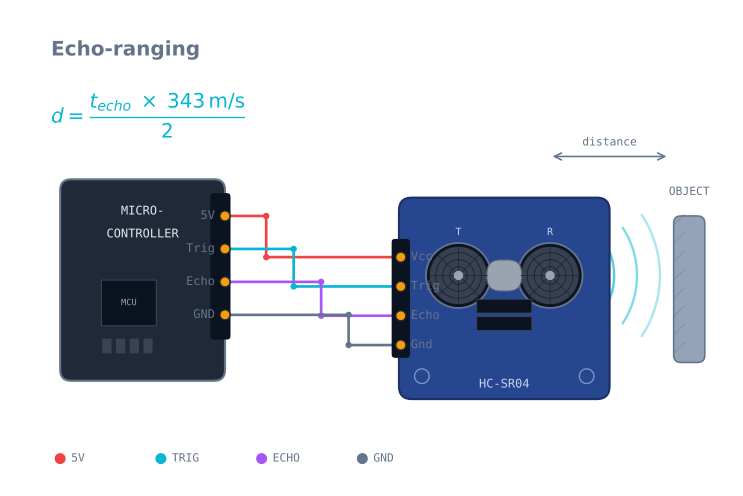
How it works
The sensor speaks a simple two-wire language:
- You pulse the Trigger pin HIGH for 10 microseconds.
- The sensor fires eight ultrasonic pulses at 40 kHz and raises the Echo pin.
- When the echo returns, it drops Echo LOW again.
- You measure how long Echo stayed HIGH.
That pulse width is the round-trip time. Sound travels about 343 m/s in air, so distance = (echo_time × 343) / 2—the division by two because the sound went out and came back. Most Arduino code wraps this in pulseIn() and a bit of arithmetic.
Because it depends on the speed of sound, the reading drifts slightly with temperature (sound is faster in warm air). For a robot avoiding walls that error is negligible; for precise ranging it matters, and you would compensate for temperature.
When to use it
Reach for an HC-SR04 whenever a robot needs to know roughly how far away the nearest thing is—obstacle avoidance, wall-following, a “don’t drive off the table” guard, or triggering a behaviour when something approaches. Its wide beam is actually helpful here: it is hard to miss an obstacle.
Look elsewhere when you need a precise distance, a narrow beam, or fast updates. A time-of-flight sensor uses light instead of sound and gives a tight, fast, millimetre-accurate reading—better for mapping or a robot that must judge a specific gap.
Wiring and gotchas
- Echo is a 5 V pin. On a 5 V board like the Arduino Uno that’s fine. On a 3.3 V board like the ESP32, put a voltage divider on Echo or you risk damaging the pin.
- Mind the blind spot and the cone. Nothing closer than ~2 cm registers, and the ~15° beam means the sensor reports the nearest thing in a cone—a table leg to the side can trigger it.
- Soft and angled targets lie. Foam, cloth, or a wall at a steep angle scatter the echo away from the receiver, so the sensor reads “far” or nothing. It works best on flat, hard surfaces facing it.
- Don’t poll too fast. Leave ~60 ms between readings so the previous echo has died away; ping sooner and stray echoes give false readings. Filtering the stream helps—see taming sensor noise.
Pinout
| Pin | Name | Direction | What it does |
|---|---|---|---|
| 1 | VCC | In | 5 V. The board draws about 15 mA, spiking during a ping |
| 2 | Trig | In | Pulse HIGH for 10 µs to start a measurement |
| 3 | Echo | Out | Goes HIGH when the burst leaves, LOW when it returns. 5 V output |
| 4 | GND | — | Ground |
The four pins are always in this order, and the module is almost always oriented with the
pins facing away from the transducers, so VCC is on the left when you are looking at the
“eyes”.
Wiring it to an Arduino
| HC-SR04 | Arduino Uno | ESP32 |
|---|---|---|
| VCC | 5 V | 5 V (from VIN, not the 3.3 V rail) |
| Trig | Any digital pin | Any GPIO |
| Echo | Any digital pin | Through a divider — see below |
| GND | GND | GND |
The 3.3 V problem
The Echo pin drives a full 5 V, and an ESP32 or Raspberry Pi GPIO is rated for 3.3 V. Feeding 5 V into one is outside its absolute maximum, and while it often survives for a while, it is genuinely damaging the pin. Two resistors fix it:
Echo ──┬── 1 kΩ ──┬── to 3.3 V GPIO
       │          │
       │        2 kΩ
       │          │
       └──────────┴── GND
That divider gives 5 V × 2/(1+2) = 3.33 V. Any ratio near 2:1 works — 1 kΩ and 2 kΩ, or
10 kΩ and 20 kΩ. Do not use values above about 20 kΩ, or the pin’s input capacitance slows
the edge enough to distort the timing you are trying to measure.
The distance arithmetic, and where it goes wrong
distance = (echo_microseconds x speed_of_sound) / 2Sound travels 343 m/s at 20 °C, which is 0.0343 cm/µs. That gives the constant everyone uses: divide the echo time by 58.2 to get centimetres.
The speed of sound is temperature dependent, roughly:
speed (m/s) = 331.3 + 0.606 x temperature_celsius| Temperature | Speed of sound | Error if you assume 20 °C |
|---|---|---|
| 0 °C | 331 m/s | Reads 3.5% too far |
| 20 °C | 343 m/s | — |
| 40 °C | 356 m/s | Reads 3.7% too near |
At 2 m that is about 7 cm across a garage in winter versus a warm room. For obstacle avoidance it is irrelevant. For anything measuring a gap, compensate — and if you have an MPU-6050 or almost any I²C sensor on the robot, you already have a temperature reading.
Minimal working code
const int TRIG = 9, ECHO = 10;
const unsigned long TIMEOUT_US = 25000UL;   // ~4.3 m, past the sensor's range

void setup() {
  Serial.begin(115200);
  pinMode(TRIG, OUTPUT);
  pinMode(ECHO, INPUT);
}

// Returns centimetres, or -1 when nothing came back.
float pingCm() {
  digitalWrite(TRIG, LOW);  delayMicroseconds(2);
  digitalWrite(TRIG, HIGH); delayMicroseconds(10);
  digitalWrite(TRIG, LOW);

  unsigned long us = pulseIn(ECHO, HIGH, TIMEOUT_US);
  if (us == 0) return -1.0f;        // timeout: no echo, NOT "zero distance"
  return us / 58.2f;
}

// Median of three kills the occasional wild reading.
float pingMedianCm() {
  float a = pingCm(); delay(60);
  float b = pingCm(); delay(60);
  float c = pingCm();
  if (a > b) { float t = a; a = b; b = t; }
  if (b > c) { float t = b; b = c; c = t; }
  if (a > b) { float t = a; a = b; b = t; }
  return b;
}

void loop() {
  float cm = pingMedianCm();
  if (cm < 0) Serial.println("no echo");
  else        Serial.println(cm);
  delay(60);
}
Three details in there are the difference between a sensor that works and one that does not:
The timeout is not optional. pulseIn without a timeout blocks until an echo arrives,
and on a soft or angled surface none ever does. The robot appears to freeze at random
intervals, and the cause looks like anything but the sensor.
Zero is not a distance. A timeout means “nothing came back”, which usually means the nearest thing is far away or invisible — the opposite of zero. Code that treats a timeout as 0 cm will emergency-stop in an empty room.
The median of three discards the single wild reading these sensors produce regularly. One spurious 20 cm value in open space is enough to swerve a robot into a wall.
Reading the beam pattern honestly
The specification says 15°, which sounds like a narrow torch beam. It is not — that is the half-angle of the main lobe, and the practical consequence is that at 1 m the sensor is listening to a cone roughly 50 cm across.
| Distance | Approximate cone width |
|---|---|
| 20 cm | ~10 cm |
| 50 cm | ~26 cm |
| 1 m | ~53 cm |
| 2 m | ~105 cm |
The sensor reports the nearest thing anywhere in that cone, and tells you nothing about where in the cone it was. That is why an HC-SR04 detects a door frame it cannot locate, and why a table leg well off to the side triggers a stop.
For wandering a room this is an advantage — it is very hard to miss an obstacle. For measuring the distance to a particular thing, it is disqualifying, and you want a VL53L0X.
What it cannot see
These are physics, not defects, and designing around them is the job:
| Surface | What happens | Why |
|---|---|---|
| Wall at more than ~45° | Reads far, or nothing | Sound reflects away from the receiver, like light off a mirror |
| Cushions, curtains, foam | Reads nothing | The material absorbs the pulse instead of reflecting it |
| Very close objects | Reads nothing under ~2 cm | The receiver is still deaf from the transmit burst |
| Thin objects (a chair leg edge-on) | Detected but mislocated | The cone is wide; the return is real but the bearing is not |
| Another HC-SR04 nearby | Random wild readings | It hears the other sensor’s chirp — stagger their timing |
A robot relying only on ultrasonic ranging will eventually push a curtain until something gives. This is exactly why a bump switch is the cheapest reliability on the whole robot.
Troubleshooting
| Symptom | Likely cause | Fix |
|---|---|---|
| Always reads 0 | Treating a timeout as a distance | Return a sentinel and handle “no echo” explicitly |
| Robot freezes at random | pulseIn with no timeout |
Pass a timeout — 25000 µs covers the full range |
| Readings jump wildly | Polling faster than ~60 ms | Wait for the previous echo to die out |
| Steady but wrong by a few percent | Temperature | Compensate with the speed-of-sound formula |
| Works on the bench, not on the robot | Motor noise on the 5 V rail | Decouple the sensor’s supply; keep its wires away from motor leads |
| Two sensors interfere | Both hearing each other | Trigger them in turn, never simultaneously |
| ESP32 pin stopped responding | 5 V Echo into a 3.3 V GPIO | Add the divider — and check the pin still works |
| Detects things that are not ahead | The 15° cone | Expected; narrow the useful angle mechanically or use a laser sensor |
HC-SR04 or VL53L0X?
| HC-SR04 | VL53L0X | |
|---|---|---|
| Method | 40 kHz sound | 940 nm laser time-of-flight |
| Range | 2 cm – 4 m | 3 cm – 2 m (up to 4 m in the best case) |
| Beam | ~15° half-angle — wide cone | ~25° field of view, but effectively a narrow spot |
| Update rate | ~16 Hz (60 ms cycle) | Up to 50 Hz |
| Blind to | Soft and steeply angled surfaces | Dark matte and mirrored surfaces, bright sunlight |
| Interface | Two pins, no library needed | I²C |
| Cost | ~$2 | ~$5 |
They fail on opposite materials, which is what makes the choice easy once you know the room. Sonar sees a black cloth-covered box that the laser cannot; the laser sees a glass door at an angle that the sonar cannot. On a robot that has to be reliable, the honest answer is often both — plus a bump switch for when they are both wrong.
Explore the graph
Used in these builds
Projects, learning paths, and simulators that include the HC-SR04 Ultrasonic Sensor.
Compare
Alternatives
Questions
HC-SR04 Ultrasonic Sensor FAQ
What is the HC-SR04 ultrasonic sensor?
The HC-SR04 is a low-cost distance sensor that measures how far away an object is by bouncing a burst of ultrasound off it—the same principle bats and sonar use. It is the sensor most beginner robots use to detect and avoid obstacles.
How does the HC-SR04 work?
You send a short pulse to its Trigger pin. The sensor emits eight 40 kHz ultrasonic bursts and raises its Echo pin until the reflection returns. You measure how long Echo stays high, and since sound travels about 343 m/s, distance equals that time times the speed of sound, divided by two for the round trip.
What is the maximum range of the HC-SR04?
The HC-SR04 measures roughly 2 cm to 4 m. It is most accurate in the 5 cm to 2 m band; near the 4 m limit readings get unreliable, and objects closer than about 2 cm fall inside its blind spot and cannot be measured.
Is the HC-SR04 accurate and reliable?
It is accurate enough for obstacle avoidance—around 3 mm resolution on a flat, hard target facing it squarely. It struggles with soft or angled surfaces (which scatter the echo), is affected by temperature, and has a wide ~15° beam, so it senses a cone, not a point.
How do you connect an HC-SR04 to an Arduino?
Wire VCC to 5 V, GND to ground, Trigger to any digital output pin, and Echo to a digital input pin. One caution: Echo outputs 5 V, so if you use a 3.3 V board like an ESP32, drop it with a voltage divider before reading it.
HC-SR04 vs US-100—which is better?
The US-100 is a close cousin with a temperature-compensated mode, a serial interface option, and 3.3–5 V operation, which makes it more accurate and easier on 3.3 V boards. The HC-SR04 is cheaper and has more tutorials. For learning, the HC-SR04 is fine; for precision, the US-100 edges ahead.
How do I check if my ultrasonic sensor is working?
Print the measured distance to the serial monitor and move your hand toward and away from the sensor—the reading should track smoothly. If it is stuck at zero or a maximum value, check the Trigger and Echo wiring, confirm it has a solid 5 V supply, and make sure your timeout is long enough for the full 4 m range.
Further reading